No. AI is used only where semantic context is needed, such as understanding what a section represents. Deterministic system work stays code-driven.

01 / 10Get Started
Clean up your Webflow project.Build the system from what is already there.
Styler scans your existing Webflow structure, detects reusable style patterns and helps turn them into a cleaner naming and variable system.
CHAPTER 01 · FROM CHAOS TO SYSTEM
The code finds the structure.AI helps name it. You decide what changes.
Styler scans your existing Webflow project first. AI only helps generate clearer names by reading the actual content and context of the site. Nothing is renamed, created or applied until you review and approve it.
STYLE AUDITDetected structure chaos
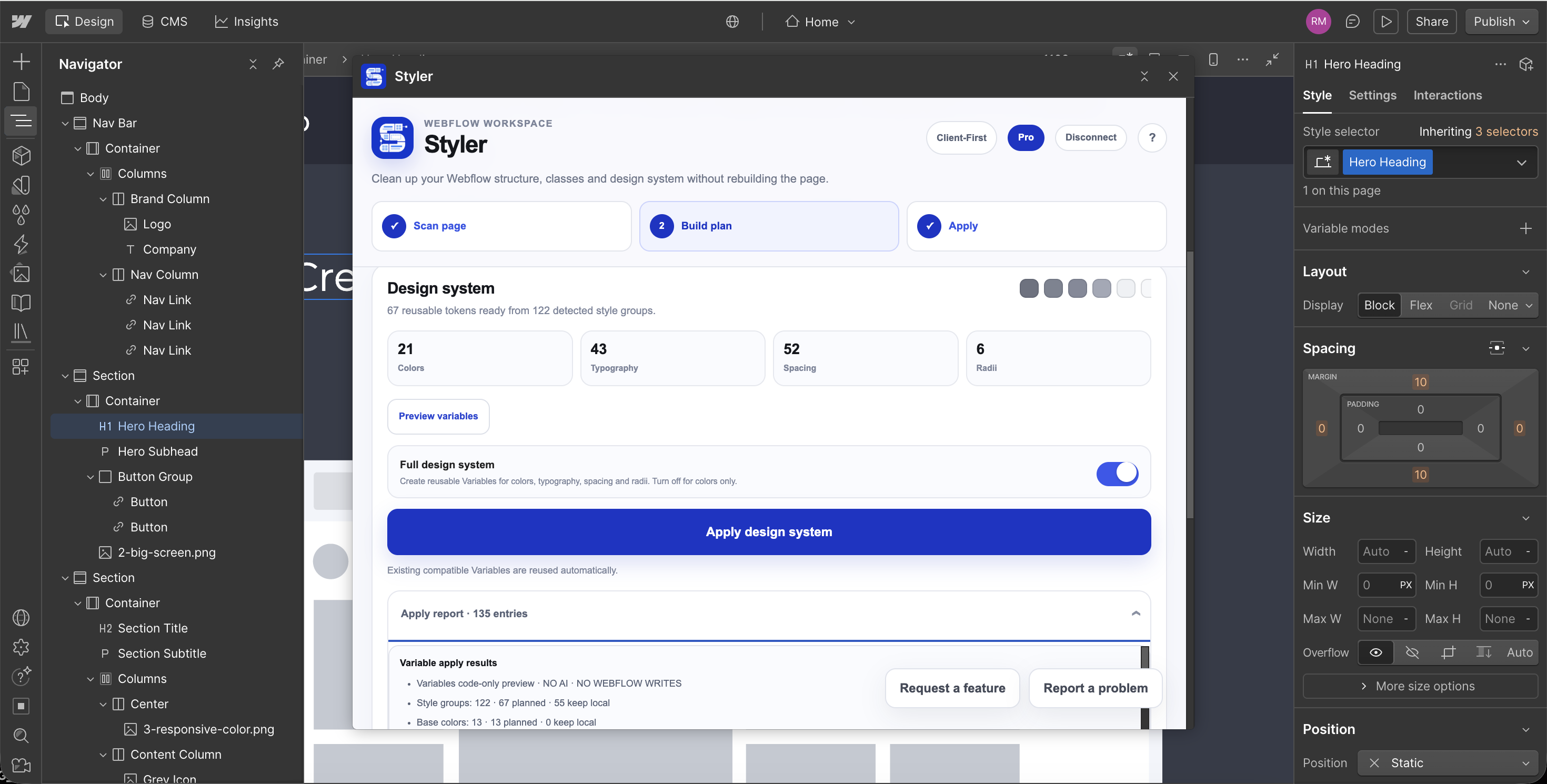
122 style groups found21Duplicate colors
43Typography patterns
52Spacing values
18Unclear class names
BEFOREDetected mess
Inconsistent class names
text-blue-14Text-14-blueheroheading2div-block-27copy-copyh1-newbtn-main-2padding-18margin-bigrandom-class
Too many similar colors
#285CFF
#2D62FF
#315FFF
#2B5CF8
#2E63FA
#F5F7FF
Mixed spacing scale
7px11px18px23px29px41px
Code finds
AFTER REVIEWSuggested system
text-blue-14
→text / body / primary
heroheading2
→heading / hero
btn-main-2
→button / primary
padding-18
→space / md
margin-big
→space / xl
div-block-27
→card / feature
✓
Nothing changes without your approvalAI suggests names from the site context, but you review and approve every change before apply.
CHAPTER 02 · Context
AI reads meaning.Code keeps the system precise.
Styler scans the page structure with code. AI is used only when a section needs a meaningful name, reading the actual content and context to suggest one. Nothing is applied until you review and approve it.
SECTION NAMINGAI only where context matters
Suggestion onlySECTION 12Detected by code
HEADINGWhat our clients sayCONTENT
“The entire experience was seamless from start to finish.”
“We would absolutely work with them again.”
Current section namesection-12
AI reads meaning
AI SUGGESTION
Suggested section namesection_testimonials
Suggested from the heading, testimonial copy and section context.
WHY THIS NAME
The section contains customer quotes and social proof, so “testimonials” describes its actual purpose.
✓
No Webflow write
The suggestion stays in review until you approve it.
CHAPTER 03 · System
AI names what needs context.Code builds everything that needs precision.
After section naming, Styler switches back to deterministic code. It analyzes existing classes and values, builds a Client-First v2 variable plan and separates safe changes from anything that could create conflicts or alter the design.
CLIENT-FIRST V2Build the system from existing styles
CODE ONLY122Detected style groups
67Planned variables
49Safe to connect
18Skipped for safety
DETECTEDExisting Webflow values
#101010Text color
#F5F5F3Background
16pxBody size
24pxSpacing
32pxSection gap
12pxRadius
Code maps
PLANNEDClient-First variables
COLORText/PrimarySAFE
COLORBackground/PrimarySAFE
TYPETypography/BodySAFE
SPACESpacing/MSAFE
SPACESpacing/XLSAFE
RADIUSRadius/MSAFE
SAFETY FILTERPotential conflicts are skipped automatically
18 skippedbutton-primarySkipped · existing variable dependency
hero-titleSkipped · could change computed typography
card-wrapperSkipped · conflicting local style detected
✓
Styler explains why each item was skipped instead of forcing a change.
CHAPTER 04 · Apply
Approve once.Styler connects the system to Webflow.
After approval, Styler creates the planned Variables and connects compatible existing styles to them. Unsafe items stay untouched, and Undo can restore the previous state without a manual backup.
WEBFLOW APPLYVariables connected to real styles
Ready after approvalPLANNEDStyler variable plan
Text/Primary#101010
Background/Primary#F5F5F3
Typography/Body16px
Spacing/M24px
Spacing/XL32px
Radius/M12px
✓
Approved by you
Nothing is written until you explicitly approve this plan.
Apply
WEBFLOW STYLE PANELLinked Variables
LIVEText color
Text/Primary↗
Background
Background/Primary↗
Font size
Typography/Body↗
Gap
Spacing/M↗
Border radius
Radius/M↗
✓
Connected to Webflow Variables
Values are no longer just hardcoded style values.
CHAPTER 05 · Review
Review first.Apply when ready.
Styler shows the suggested structure before you apply it. You decide which changes belong in the project.
SAFETY & CONTROLYou stay in control of every write
Protected workflow49Approved
18Skipped
0Forced changes
BEFORE APPLYReview every planned change
Pending approval✓
Text/PrimaryReady to connect
APPROVED✓
Spacing/MReady to connect
APPROVED!
button-primaryExisting dependency detected
SKIPPED!
hero-titleChange could affect the current design
SKIPPEDi
Why was it skipped?
Styler shows the reason instead of silently changing a risky style.
AFTER APPLYChange history
Applied✓
49 changes applied
Variables created and compatible styles connected.
–
18 changes skipped
Potential conflicts stayed untouched.
↶
UNDO LAST APPLYRestore previous state
Roll back the applied Styler changes without creating a manual backup first.
✓
Previous state can be restored
Your original setup remains recoverable through Undo.
WHY STYLER
Your Webflow project works.The system underneath it doesn't.
Projects grow. Classes get duplicated. Values become hardcoded. Naming loses consistency. Eventually the site still works, but maintaining the system underneath it becomes slower and riskier.
THE REAL PROBLEMCleaning that structure manually can take longer than building the page in the first place.
EXISTING WEBFLOW PROJECTThe hidden maintenance debt
Before Styler01
Inconsistent class names
STRUCTURESimilar elements accumulate different naming patterns over time.
02
Repeated design values
TOKENSColors, typography, spacing and radii exist as disconnected values.
03
Hardcoded styles
VARIABLESValues live directly inside styles instead of a reusable Variable system.
04
Manual cleanup is risky
RISKChanging an existing project by hand can affect dependencies you did not intend to touch.
Instead of rebuilding the project
STYLERFix the system that is already there.
Scan the existing project, build the structure around it, review the plan and apply only what is safe.
✓No rebuild
✓No blind writes
✓No manual backup
 BUILT FOR EXISTING WEBFLOW PROJECTS
Turn the project you already have
into the system it should have been.
Styler reads your existing structure, uses AI only where context matters, builds the deterministic system with code and keeps every write behind your approval.
01Scan
Read the structure already inside your Webflow project.
02Name
Use AI only where semantic context is actually needed.
03System
Build the Client-First v2 structure and Variables with code.
04Approve
Nothing reaches Webflow until you approve the plan.
05Undo
Restore the previous state without a manual backup.